データエンジニアリングの需要が急増する中、Apache Airflowを使ったデータパイプラインの構築・運用スキルは、SES市場で最も価値の高いスキルの一つとなっています。AWS MWAA(Amazon Managed Workflows for Apache Airflow)は、Airflowのインフラ管理を不要にし、エンジニアがパイプラインのロジックに集中できる環境を提供します。
本記事では、AWS MWAAを使ったデータパイプライン構築の基本から実践的な運用まで、SES案件で即活用できるスキルを体系的に解説します。DAG設計のベストプラクティス、S3・Redshift・Glue連携、監視・トラブルシューティングまで、現場で必要なノウハウをお伝えします。
AWS MWAAとは:Apache Airflowのマネージドサービス
Apache Airflowの基本概念
Apache Airflowは、データパイプラインのオーケストレーションツールです。Pythonでワークフロー(DAG: Directed Acyclic Graph)を定義し、タスクの依存関係を管理しながら実行します。
Airflowの主要コンポーネント:
- DAG(有向非巡回グラフ): ワークフロー全体を定義するPythonファイル
- Task: DAG内の個々の処理ステップ
- Operator: タスクの実行内容を定義する部品(BashOperator、PythonOperator等)
- Scheduler: DAGのスケジュール管理と実行制御
- Executor: タスクの実行環境(CeleryExecutor、LocalExecutor等)
- Metastore: DAGの実行状態を管理するデータベース
AWS MWAA vs 自前構築
| 項目 | AWS MWAA | 自前構築(EC2/EKS) |
|---|---|---|
| インフラ管理 | 不要(フルマネージド) | 必要(サーバー管理) |
| スケーリング | 自動 | 手動設定 |
| アップグレード | AWSが管理 | 自前で対応 |
| セキュリティ | VPC統合・IAM連携 | 自前で設定 |
| コスト | 環境サイズに応じた固定費 | EC2/EKSのコスト |
| カスタマイズ性 | 一部制限あり | 完全にカスタマイズ可能 |
| 可用性 | マルチAZ対応 | 自前で構成 |
| 初期構築時間 | 約30分 | 数日〜1週間 |
MWAA環境のサイズと料金(2026年時点)
| 環境クラス | Worker数 | 月額概算 | 適用シナリオ |
|---|---|---|---|
| mw1.small | 1-5 | 約$350 | 開発・検証環境 |
| mw1.medium | 1-10 | 約$700 | 中規模パイプライン |
| mw1.large | 1-20 | 約$1,200 | 大規模本番環境 |
| mw1.xlarge | 1-25 | 約$2,000 | ハイパフォーマンス |
| mw1.2xlarge | 1-25 | 約$3,500 | 超大規模処理 |
MWAA環境のセットアップ
Terraformによる環境構築
# MWAA環境
resource "aws_mwaa_environment" "main" {
  name               = "data-pipeline-prod"
  airflow_version    = "2.10.4"
  environment_class  = "mw1.medium"

  source_bucket_arn          = aws_s3_bucket.mwaa.arn
  dag_s3_path                = "dags/"
  requirements_s3_path       = "requirements.txt"
  plugins_s3_path            = "plugins.zip"

  execution_role_arn = aws_iam_role.mwaa.arn

  network_configuration {
    security_group_ids = [aws_security_group.mwaa.id]
    subnet_ids         = var.private_subnet_ids
  }

  logging_configuration {
    dag_processing_logs {
      enabled   = true
      log_level = "INFO"
    }
    scheduler_logs {
      enabled   = true
      log_level = "WARNING"
    }
    task_logs {
      enabled   = true
      log_level = "INFO"
    }
    webserver_logs {
      enabled   = true
      log_level = "WARNING"
    }
    worker_logs {
      enabled   = true
      log_level = "WARNING"
    }
  }

  airflow_configuration_options = {
    "core.default_timezone"           = "Asia/Tokyo"
    "core.parallelism"                = "32"
    "core.max_active_runs_per_dag"    = "3"
    "celery.worker_concurrency"       = "8"
    "scheduler.catchup_by_default"    = "false"
    "webserver.default_ui_timezone"   = "Asia/Tokyo"
  }

  max_workers = 10
  min_workers = 1

  tags = {
    Environment = "production"
    Project     = "data-pipeline"
  }
}

# S3バケット(DAG・プラグイン格納)
resource "aws_s3_bucket" "mwaa" {
  bucket = "mwaa-data-pipeline-prod"
}

resource "aws_s3_bucket_versioning" "mwaa" {
  bucket = aws_s3_bucket.mwaa.id
  versioning_configuration {
    status = "Enabled"
  }
}

resource "aws_s3_bucket_public_access_block" "mwaa" {
  bucket                  = aws_s3_bucket.mwaa.id
  block_public_acls       = true
  block_public_policy     = true
  ignore_public_acls      = true
  restrict_public_buckets = true
}

# IAMロール
resource "aws_iam_role" "mwaa" {
  name = "mwaa-execution-role"

  assume_role_policy = jsonencode({
    Version = "2012-10-17"
    Statement = [
      {
        Effect = "Allow"
        Principal = {
          Service = ["airflow.amazonaws.com", "airflow-env.amazonaws.com"]
        }
        Action = "sts:AssumeRole"
      }
    ]
  })
}

resource "aws_iam_role_policy" "mwaa" {
  name = "mwaa-execution-policy"
  role = aws_iam_role.mwaa.id

  policy = jsonencode({
    Version = "2012-10-17"
    Statement = [
      {
        Effect = "Allow"
        Action = [
          "s3:GetObject*",
          "s3:PutObject*",
          "s3:ListBucket",
          "s3:DeleteObject"
        ]
        Resource = [
          aws_s3_bucket.mwaa.arn,
          "${aws_s3_bucket.mwaa.arn}/*",
          "arn:aws:s3:::data-lake-*",
          "arn:aws:s3:::data-lake-*/*"
        ]
      },
      {
        Effect = "Allow"
        Action = [
          "logs:CreateLogStream",
          "logs:CreateLogGroup",
          "logs:PutLogEvents",
          "logs:GetLogEvents",
          "logs:GetLogRecord"
        ]
        Resource = "arn:aws:logs:*:*:log-group:airflow-*"
      },
      {
        Effect = "Allow"
        Action = [
          "glue:*Job*",
          "glue:*Crawler*",
          "glue:GetDatabase*",
          "glue:GetTable*",
          "glue:GetPartition*"
        ]
        Resource = "*"
      },
      {
        Effect = "Allow"
        Action = [
          "redshift-data:ExecuteStatement",
          "redshift-data:GetStatementResult",
          "redshift-data:DescribeStatement",
          "redshift-data:ListStatements"
        ]
        Resource = "*"
      }
    ]
  })
}
DAG設計のベストプラクティス
基本的なETL DAG
"""
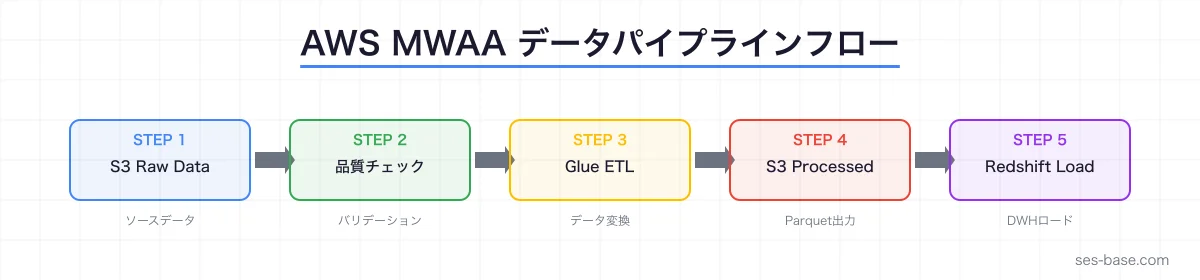
ETL DAG: S3 → Glue → Redshift のデータパイプライン
日次実行で売上データを処理する
"""
from datetime import datetime, timedelta
from airflow import DAG
from airflow.operators.python import PythonOperator
from airflow.providers.amazon.aws.operators.s3 import S3ListOperator
from airflow.providers.amazon.aws.operators.glue import GlueJobOperator
from airflow.providers.amazon.aws.operators.redshift_data import RedshiftDataOperator
from airflow.providers.amazon.aws.sensors.s3 import S3KeySensor
from airflow.operators.empty import EmptyOperator

# デフォルト引数
default_args = {
    'owner': 'data-team',
    'depends_on_past': False,
    'email': ['data-alerts@example.com'],
    'email_on_failure': True,
    'email_on_retry': False,
    'retries': 3,
    'retry_delay': timedelta(minutes=5),
    'retry_exponential_backoff': True,
    'max_retry_delay': timedelta(minutes=30),
    'execution_timeout': timedelta(hours=2),
}

with DAG(
    dag_id='daily_sales_etl',
    default_args=default_args,
    description='日次売上データETLパイプライン',
    schedule_interval='0 2 * * *',  # 毎日AM2:00 JST
    start_date=datetime(2026, 1, 1),
    catchup=False,
    max_active_runs=1,
    tags=['etl', 'sales', 'daily'],
) as dag:

    # DAG開始マーカー
    start = EmptyOperator(task_id='start')

    # 1. S3にソースデータが到着するのを待機
    wait_for_source = S3KeySensor(
        task_id='wait_for_source_data',
        bucket_name='data-lake-raw',
        bucket_key='sales/{{ ds }}/sales_data.csv',
        aws_conn_id='aws_default',
        timeout=3600,  # 1時間待機
        poke_interval=60,  # 1分ごとにチェック
        mode='poke',
    )

    # 2. データ品質チェック
    def validate_source_data(**context):
        """ソースデータの品質チェック"""
        import boto3
        import csv
        from io import StringIO

        s3 = boto3.client('s3')
        ds = context['ds']

        response = s3.get_object(
            Bucket='data-lake-raw',
            Key=f'sales/{ds}/sales_data.csv'
        )
        content = response['Body'].read().decode('utf-8')
        reader = csv.DictReader(StringIO(content))
        rows = list(reader)

        # 品質チェック
        assert len(rows) > 0, "データが空です"

        required_columns = ['order_id', 'amount', 'customer_id', 'order_date']
        actual_columns = set(rows[0].keys())
        missing = set(required_columns) - actual_columns
        assert not missing, f"必須カラムが不足: {missing}"

        # NULLチェック
        null_count = sum(1 for row in rows if not row.get('order_id'))
        assert null_count == 0, f"order_idにNULLが{null_count}件あります"

        # 金額の妥当性チェック
        invalid_amounts = [
            row for row in rows
            if float(row.get('amount', 0)) < 0
        ]
        assert len(invalid_amounts) == 0, f"負の金額が{len(invalid_amounts)}件あります"

        context['ti'].xcom_push(key='row_count', value=len(rows))
        print(f"✅ データ品質チェック通過: {len(rows)}行")

    validate_data = PythonOperator(
        task_id='validate_source_data',
        python_callable=validate_source_data,
    )

    # 3. Glue ETLジョブ実行
    run_glue_job = GlueJobOperator(
        task_id='run_glue_etl',
        job_name='sales-data-etl',
        script_location='s3://glue-scripts/sales_etl.py',
        aws_conn_id='aws_default',
        script_args={
            '--source_path': 's3://data-lake-raw/sales/{{ ds }}/',
            '--target_path': 's3://data-lake-processed/sales/{{ ds }}/',
            '--execution_date': '{{ ds }}',
        },
        num_of_dpus=5,
        region_name='ap-northeast-1',
    )

    # 4. 処理済みデータのバリデーション
    def validate_processed_data(**context):
        """処理済みデータの検証"""
        import boto3

        s3 = boto3.client('s3')
        ds = context['ds']

        # Parquetファイルの存在確認
        response = s3.list_objects_v2(
            Bucket='data-lake-processed',
            Prefix=f'sales/{ds}/',
        )

        files = response.get('Contents', [])
        assert len(files) > 0, "処理済みファイルが見つかりません"

        total_size = sum(f['Size'] for f in files)
        source_rows = context['ti'].xcom_pull(
            task_ids='validate_source_data', key='row_count'
        )

        print(f"✅ 処理済みファイル: {len(files)}個, 合計サイズ: {total_size/1024:.1f}KB")
        print(f"   ソース行数: {source_rows}")

    validate_processed = PythonOperator(
        task_id='validate_processed_data',
        python_callable=validate_processed_data,
    )

    # 5. Redshiftへのロード
    load_to_redshift = RedshiftDataOperator(
        task_id='load_to_redshift',
        cluster_identifier='analytics-cluster',
        database='analytics',
        sql="""
            COPY sales_staging
            FROM 's3://data-lake-processed/sales/{{ ds }}/'
            IAM_ROLE 'arn:aws:iam::123456789012:role/redshift-copy-role'
            FORMAT AS PARQUET;

            -- ステージング→本テーブルへのマージ
            BEGIN TRANSACTION;

            DELETE FROM sales_fact
            WHERE order_date = '{{ ds }}'::date;

            INSERT INTO sales_fact
            SELECT * FROM sales_staging;

            TRUNCATE TABLE sales_staging;

            END TRANSACTION;
        """,
        await_result=True,
        poll_interval=10,
    )

    # 6. データ品質チェック(Redshift上)
    quality_check_redshift = RedshiftDataOperator(
        task_id='quality_check_redshift',
        cluster_identifier='analytics-cluster',
        database='analytics',
        sql="""
            SELECT
                COUNT(*) as total_records,
                COUNT(DISTINCT order_id) as unique_orders,
                SUM(amount) as total_amount,
                MIN(order_date) as min_date,
                MAX(order_date) as max_date
            FROM sales_fact
            WHERE order_date = '{{ ds }}'::date;
        """,
        await_result=True,
    )

    # DAG完了マーカー
    end = EmptyOperator(task_id='end')

    # タスク依存関係
    start >> wait_for_source >> validate_data >> run_glue_job >> \
    validate_processed >> load_to_redshift >> quality_check_redshift >> end
データ品質モニタリングDAG
"""
データ品質モニタリングDAG
各テーブルのデータ品質を定期チェックし、異常を検出する
"""
from datetime import datetime, timedelta
from airflow import DAG
from airflow.operators.python import PythonOperator, BranchPythonOperator
from airflow.providers.amazon.aws.operators.redshift_data import RedshiftDataOperator
from airflow.providers.amazon.aws.hooks.sns import SnsHook

default_args = {
    'owner': 'data-quality',
    'retries': 2,
    'retry_delay': timedelta(minutes=3),
}

def check_data_freshness(**context):
    """データの鮮度チェック"""
    from airflow.providers.amazon.aws.hooks.redshift_data import RedshiftDataHook

    hook = RedshiftDataHook(aws_conn_id='aws_default')

    tables_to_check = [
        ('sales_fact', 'order_date', 1),       # 1日以内
        ('user_events', 'event_timestamp', 1),  # 1日以内
        ('inventory', 'updated_at', 7),         # 7日以内
    ]

    alerts = []
    for table, date_col, max_age_days in tables_to_check:
        result = hook.execute_query(
            cluster_identifier='analytics-cluster',
            database='analytics',
            sql=f"""
                SELECT
                    DATEDIFF(day, MAX({date_col}), GETDATE()) as age_days
                FROM {table}
            """,
        )

        age = result[0][0] if result else None
        if age and age > max_age_days:
            alerts.append(f"⚠️ {table}: 最新データが{age}日前(閾値: {max_age_days}日)")

    if alerts:
        context['ti'].xcom_push(key='alerts', value=alerts)
        return 'send_alert'
    return 'no_alert'

def send_quality_alert(**context):
    """品質アラートをSNSで送信"""
    alerts = context['ti'].xcom_pull(
        task_ids='check_freshness', key='alerts'
    )

    hook = SnsHook(aws_conn_id='aws_default')
    hook.publish_to_target(
        target_arn='arn:aws:sns:ap-northeast-1:123456789012:data-quality-alerts',
        message='\n'.join(alerts),
        subject='[データ品質] 異常検出',
    )

with DAG(
    dag_id='data_quality_monitoring',
    default_args=default_args,
    schedule_interval='0 */6 * * *',  # 6時間ごと
    start_date=datetime(2026, 1, 1),
    catchup=False,
    tags=['monitoring', 'data-quality'],
) as dag:

    check_freshness = BranchPythonOperator(
        task_id='check_freshness',
        python_callable=check_data_freshness,
    )

    alert = PythonOperator(
        task_id='send_alert',
        python_callable=send_quality_alert,
    )

    no_alert = PythonOperator(
        task_id='no_alert',
        python_callable=lambda: print("✅ データ品質正常"),
    )

    check_freshness >> [alert, no_alert]
運用・監視のベストプラクティス
CloudWatchによるMWAA監視
# CloudWatchダッシュボード設定(AWS CDK)
from aws_cdk import (
    aws_cloudwatch as cw,
    Duration,
)

dashboard = cw.Dashboard(self, "MWAADashboard",
    dashboard_name="mwaa-monitoring"
)

# DAG実行成功率
dag_success_widget = cw.GraphWidget(
    title="DAG実行結果",
    left=[
        cw.Metric(
            namespace="AmazonMWAA",
            metric_name="DAGProcessingSuccess",
            dimensions_map={"Environment": "data-pipeline-prod"},
            statistic="Sum",
            period=Duration.minutes(5),
        ),
        cw.Metric(
            namespace="AmazonMWAA",
            metric_name="DAGProcessingFailure",
            dimensions_map={"Environment": "data-pipeline-prod"},
            statistic="Sum",
            period=Duration.minutes(5),
        ),
    ],
    width=12,
)

# Worker使用率
worker_widget = cw.GraphWidget(
    title="Worker使用率",
    left=[
        cw.Metric(
            namespace="AmazonMWAA",
            metric_name="RunningTasks",
            dimensions_map={"Environment": "data-pipeline-prod"},
            statistic="Average",
            period=Duration.minutes(5),
        ),
        cw.Metric(
            namespace="AmazonMWAA",
            metric_name="QueuedTasks",
            dimensions_map={"Environment": "data-pipeline-prod"},
            statistic="Average",
            period=Duration.minutes(5),
        ),
    ],
    width=12,
)

dashboard.add_widgets(dag_success_widget, worker_widget)
トラブルシューティングガイド
| 症状 | 考えられる原因 | 対応方法 |
|---|---|---|
| DAGが表示されない | 構文エラー、import失敗 | CloudWatch Logsのdag-processing-logsを確認 |
| タスクがキューで滞留 | Worker不足、メモリ不足 | Worker数を増加、環境クラスをアップグレード |
| タスクがタイムアウト | 処理時間超過、外部サービス遅延 | execution_timeoutを調整、リトライ戦略を見直し |
| OOM(メモリ不足) | 大量データのインメモリ処理 | チャンク処理に変更、Glueに処理を移譲 |
| S3アクセス拒否 | IAMロール権限不足 | 実行ロールのポリシーを確認・更新 |
SES案件でのデータエンジニアリングスキル
需要の高いスキルセット
- Apache Airflow / MWAA: DAG設計、運用、トラブルシューティング
- AWS Glue: ETLジョブ、Crawlerの設計
- Amazon Redshift: データウェアハウス設計、クエリ最適化
- dbt: データ変換、テスト、ドキュメンテーション
- Spark / EMR: 大規模データ処理
SES市場での単価傾向(2026年)
- データエンジニア(Airflow + AWS): 月額75〜100万円
- データプラットフォームエンジニア: 月額85〜110万円
- MLOps / データパイプライン: 月額80〜105万円
- dbt + Airflow: 月額70〜90万円
まとめ:AWS MWAAでデータパイプラインを構築するポイント
AWS MWAAを使ったデータパイプライン構築の要点をまとめます。
- マネージド環境の活用: インフラ管理をAWSに任せ、DAG開発に集中
- DAG設計のベストプラクティス: 冪等性、データ品質チェック、エラーハンドリングを組み込む
- AWS統合: S3、Glue、Redshift、SNSとの連携でフルマネージドなパイプラインを実現
- 監視・アラート: CloudWatch + SNSで問題を早期検出
- コスト最適化: Worker数の動的調整、環境クラスの適切な選択
データエンジニアリングスキルは、SES市場で最も成長率が高い分野の一つです。AWS MWAAをマスターして、高単価案件を獲得しましょう。