Java Spring Bootは、エンタープライズ開発の現場で圧倒的なシェアを誇るフレームワークです。SES案件においてもJava Spring Boot経験者の需要は依然として非常に高く、2026年時点でSES市場の求人の約35%がJava関連です。しかし、Springの設定ファイルの多さやボイラープレートコードの冗長さに悩むエンジニアも少なくありません。
本記事では、OpenAI Codex CLIを使ってJava Spring Boot開発を劇的に効率化する方法を解説します。プロジェクトのスキャフォールディングからREST API実装、JPA設計、テスト自動化まで、AIと協働することで開発速度を3倍以上にするテクニックを実践的にお伝えします。
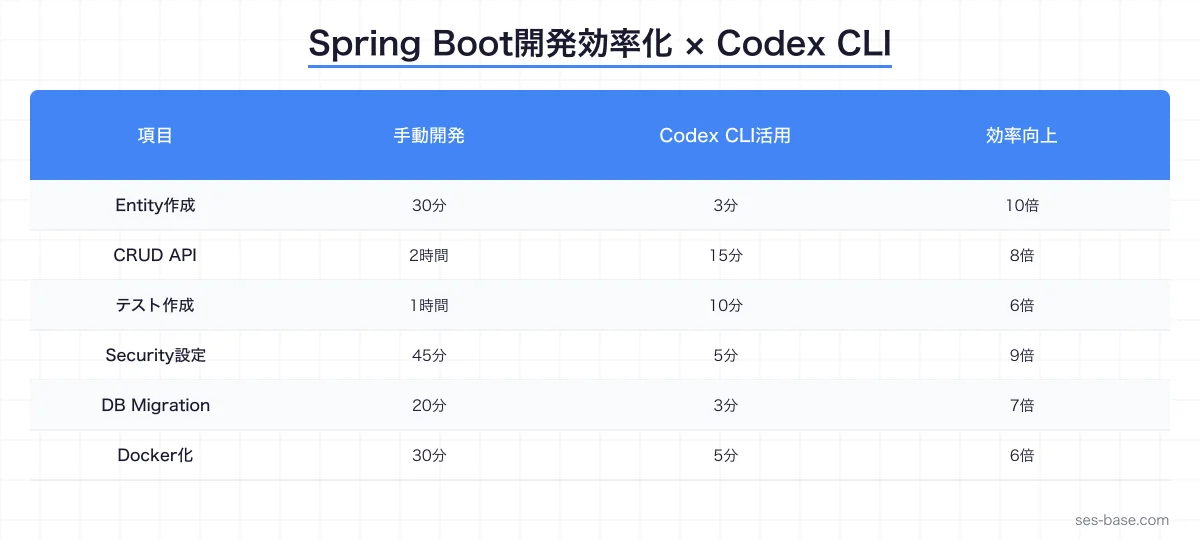
なぜCodex CLI × Java Spring Bootなのか
Java Spring Boot開発の課題
Spring Boot開発では、以下の課題が頻繁に発生します。
- 大量のボイラープレートコード: Entity、Repository、Service、Controller、DTO、Mapper…同じパターンの繰り返し
- 設定ファイルの複雑さ: application.yml、SecurityConfig、JPA設定など多数の設定が必要
- テストコードの作成コスト: JUnit + Mockito + TestContainers でのテスト作成に時間がかかる
- アノテーション地獄:
@Transactional、@Valid、@PreAuthorizeなど、適切なアノテーションの選択に悩む
Codex CLIが解決すること
OpenAI Codex CLIはこれらの課題を以下のように解決します。
- パターン認識: 既存のコードパターンを学習し、一貫性のあるコードを生成
- 設定自動生成: セキュリティ、JPA、キャッシュなどの設定を要件に合わせて自動生成
- テスト網羅: 正常系・異常系・境界値を含む包括的なテストを自動作成
- リファクタリング提案: コードの匂い(Code Smell)を検出し、改善を提案
Codex CLIでSpring Bootプロジェクトをセットアップする
プロジェクト初期化
# Codex CLIにプロジェクト生成を依頼
codex "Java 21 + Spring Boot 3.4のプロジェクトを作成してください。
以下の依存関係を含めること:
- Spring Web
- Spring Data JPA
- Spring Security
- Spring Validation
- PostgreSQL Driver
- Flyway Migration
- Lombok
- MapStruct
- SpringDoc OpenAPI (Swagger)
- Testcontainers
パッケージ構成はクリーンアーキテクチャに準拠してください"
Codex CLIが生成するプロジェクト構造:
src/main/java/com/example/api/
├── application/           # ユースケース層
│   ├── dto/
│   │   ├── request/
│   │   └── response/
│   ├── mapper/
│   └── service/
├── domain/                # ドメイン層
│   ├── model/
│   ├── repository/
│   └── exception/
├── infrastructure/        # インフラ層
│   ├── persistence/
│   │   ├── entity/
│   │   ├── repository/
│   │   └── mapper/
│   └── config/
└── presentation/          # プレゼンテーション層
    ├── controller/
    ├── advice/
    └── filter/
application.ymlの自動生成
codex "開発環境・テスト環境・本番環境のSpring Boot設定ファイルを作成してください。
以下を設定すること:
- PostgreSQL接続(環境変数から取得)
- JPA設定(ddl-auto: validate、バッチ処理最適化)
- Flyway設定
- ログ設定(構造化ログ)
- CORS設定
- アクチュエーター設定"
# application.yml
spring:
application:
name: user-api
datasource:
url: jdbc:postgresql://${DB_HOST:localhost}:${DB_PORT:5432}/${DB_NAME:userdb}
username: ${DB_USERNAME:postgres}
password: ${DB_PASSWORD:postgres}
hikari:
maximum-pool-size: ${DB_POOL_SIZE:20}
minimum-idle: 5
connection-timeout: 30000
idle-timeout: 600000
max-lifetime: 1800000
jpa:
hibernate:
ddl-auto: validate
properties:
hibernate:
default_batch_fetch_size: 100
jdbc:
batch_size: 50
order_inserts: true
order_updates: true
format_sql: false
open-in-view: false
flyway:
enabled: true
locations: classpath:db/migration
baseline-on-migrate: true
server:
port: ${SERVER_PORT:8080}
shutdown: graceful
management:
endpoints:
web:
exposure:
include: health,info,prometheus,metrics
endpoint:
health:
show-details: when_authorized
logging:
pattern:
console: '{"timestamp":"%d{ISO8601}","level":"%level","logger":"%logger","message":"%msg","thread":"%thread"}%n'
level:
com.example: ${LOG_LEVEL:INFO}
org.hibernate.SQL: WARNREST API実装:Codex CLIでCRUDを高速に構築する
Entity設計
codex "以下のテーブル設計に基づいてJPA Entityを作成してください:

users テーブル:
- id: UUID (PK, 自動生成)
- email: VARCHAR(255) UNIQUE NOT NULL
- name: VARCHAR(100) NOT NULL
- role: ENUM('ADMIN', 'MEMBER', 'VIEWER') NOT NULL DEFAULT 'MEMBER'
- status: ENUM('ACTIVE', 'SUSPENDED', 'DELETED') NOT NULL DEFAULT 'ACTIVE'
- created_at: TIMESTAMP NOT NULL
- updated_at: TIMESTAMP NOT NULL

要件:
- Lombokを使用
- 楽観的ロック (@Version)
- ソフトデリート対応
- 監査フィールド自動設定 (@CreatedDate, @LastModifiedDate)
- equals/hashCodeはIDベース"
Codex CLIが生成するEntity:
@Entity
@Table(name = "users", indexes = {
    @Index(name = "idx_users_email", columnList = "email", unique = true),
    @Index(name = "idx_users_status", columnList = "status")
})
@Getter
@NoArgsConstructor(access = AccessLevel.PROTECTED)
@EntityListeners(AuditingEntityListener.class)
@SQLRestriction("status <> 'DELETED'")
public class UserEntity {

    @Id
    @GeneratedValue(strategy = GenerationType.UUID)
    @Column(name = "id", updatable = false)
    private UUID id;

    @Column(name = "email", nullable = false, unique = true)
    private String email;

    @Column(name = "name", nullable = false, length = 100)
    private String name;

    @Enumerated(EnumType.STRING)
    @Column(name = "role", nullable = false)
    private UserRole role = UserRole.MEMBER;

    @Enumerated(EnumType.STRING)
    @Column(name = "status", nullable = false)
    private UserStatus status = UserStatus.ACTIVE;

    @Version
    private Long version;

    @CreatedDate
    @Column(name = "created_at", nullable = false, updatable = false)
    private LocalDateTime createdAt;

    @LastModifiedDate
    @Column(name = "updated_at", nullable = false)
    private LocalDateTime updatedAt;

    // ファクトリメソッド
    public static UserEntity create(String email, String name, UserRole role) {
        UserEntity user = new UserEntity();
        user.email = email;
        user.name = name;
        user.role = role;
        user.status = UserStatus.ACTIVE;
        return user;
    }

    // ビジネスメソッド
    public void updateProfile(String name) {
        this.name = name;
    }

    public void suspend() {
        if (this.status == UserStatus.DELETED) {
            throw new IllegalStateException("削除済みユーザーは停止できません");
        }
        this.status = UserStatus.SUSPENDED;
    }

    public void softDelete() {
        this.status = UserStatus.DELETED;
    }

    @Override
    public boolean equals(Object o) {
        if (this == o) return true;
        if (!(o instanceof UserEntity that)) return false;
        return id != null && id.equals(that.id);
    }

    @Override
    public int hashCode() {
        return getClass().hashCode();
    }
}
Repositoryパターン
public interface UserRepository extends JpaRepository<UserEntity, UUID> {

    Optional<UserEntity> findByEmail(String email);

    boolean existsByEmail(String email);

    @Query("SELECT u FROM UserEntity u WHERE u.status = :status")
    Page<UserEntity> findByStatus(
        @Param("status") UserStatus status,
        Pageable pageable
    );

    @Query("""
        SELECT u FROM UserEntity u
        WHERE (:name IS NULL OR u.name LIKE %:name%)
        AND (:role IS NULL OR u.role = :role)
        AND (:status IS NULL OR u.status = :status)
        """)
    Page<UserEntity> search(
        @Param("name") String name,
        @Param("role") UserRole role,
        @Param("status") UserStatus status,
        Pageable pageable
    );

    @Modifying
    @Query("UPDATE UserEntity u SET u.status = 'DELETED' WHERE u.id = :id")
    int softDeleteById(@Param("id") UUID id);
}
Service層の実装
codex "UserServiceを実装してください。以下の要件を満たすこと:
- トランザクション管理
- ドメインイベント発行
- キャッシュ(Spring Cache)
- 入力バリデーション
- カスタム例外による適切なエラーハンドリング"@Service
@RequiredArgsConstructor
@Transactional(readOnly = true)
@Slf4j
public class UserService {
private final UserRepository userRepository;
private final UserMapper userMapper;
private final ApplicationEventPublisher eventPublisher;
@Cacheable(value = "users", key = "#id")
public UserResponse getUser(UUID id) {
UserEntity user = userRepository.findById(id)
.orElseThrow(() -> new UserNotFoundException(id));
return userMapper.toResponse(user);
}
@Transactional
@CacheEvict(value = "users", allEntries = true)
public UserResponse createUser(CreateUserRequest request) {
// 重複チェック
if (userRepository.existsByEmail(request.email())) {
throw new DuplicateEmailException(request.email());
}
UserEntity user = UserEntity.create(
request.email(),
request.name(),
request.role()
);
UserEntity saved = userRepository.save(user);
// ドメインイベント発行
eventPublisher.publishEvent(new UserCreatedEvent(saved.getId()));
log.info("ユーザー作成完了: id={}, email={}", saved.getId(), saved.getEmail());
return userMapper.toResponse(saved);
}
@Transactional
@CacheEvict(value = "users", key = "#id")
public UserResponse updateUser(UUID id, UpdateUserRequest request) {
UserEntity user = userRepository.findById(id)
.orElseThrow(() -> new UserNotFoundException(id));
user.updateProfile(request.name());
return userMapper.toResponse(user);
}
public Page<UserResponse> searchUsers(UserSearchCriteria criteria, Pageable pageable) {
return userRepository.search(
criteria.name(),
criteria.role(),
criteria.status(),
pageable
).map(userMapper::toResponse);
}
@Transactional
@CacheEvict(value = "users", key = "#id")
public void deleteUser(UUID id) {
int updated = userRepository.softDeleteById(id);
if (updated == 0) {
throw new UserNotFoundException(id);
}
eventPublisher.publishEvent(new UserDeletedEvent(id));
log.info("ユーザー削除完了: id={}", id);
}
}Controller層の実装
@RestController
@RequestMapping("/api/v1/users")
@RequiredArgsConstructor
@Tag(name = "Users", description = "ユーザー管理API")
public class UserController {

    private final UserService userService;

    @GetMapping("/{id}")
    @Operation(summary = "ユーザー取得", description = "IDを指定してユーザーを取得します")
    public ResponseEntity<UserResponse> getUser(
            @PathVariable UUID id) {
        return ResponseEntity.ok(userService.getUser(id));
    }

    @PostMapping
    @Operation(summary = "ユーザー作成", description = "新しいユーザーを作成します")
    public ResponseEntity<UserResponse> createUser(
            @Valid @RequestBody CreateUserRequest request) {
        UserResponse response = userService.createUser(request);
        URI location = URI.create("/api/v1/users/" + response.id());
        return ResponseEntity.created(location).body(response);
    }

    @PutMapping("/{id}")
    @Operation(summary = "ユーザー更新", description = "ユーザー情報を更新します")
    public ResponseEntity<UserResponse> updateUser(
            @PathVariable UUID id,
            @Valid @RequestBody UpdateUserRequest request) {
        return ResponseEntity.ok(userService.updateUser(id, request));
    }

    @GetMapping
    @Operation(summary = "ユーザー検索", description = "条件を指定してユーザーを検索します")
    public ResponseEntity<Page<UserResponse>> searchUsers(
            @ModelAttribute UserSearchCriteria criteria,
            @PageableDefault(size = 20, sort = "createdAt", direction = Sort.Direction.DESC)
            Pageable pageable) {
        return ResponseEntity.ok(userService.searchUsers(criteria, pageable));
    }

    @DeleteMapping("/{id}")
    @Operation(summary = "ユーザー削除", description = "ユーザーを論理削除します")
    @ResponseStatus(HttpStatus.NO_CONTENT)
    public void deleteUser(@PathVariable UUID id) {
        userService.deleteUser(id);
    }
}
グローバル例外ハンドリング
@RestControllerAdvice
@Slf4j
public class GlobalExceptionHandler {

    @ExceptionHandler(UserNotFoundException.class)
    public ResponseEntity<ErrorResponse> handleNotFound(UserNotFoundException ex) {
        log.warn("ユーザーが見つかりません: {}", ex.getMessage());
        return ResponseEntity.status(HttpStatus.NOT_FOUND)
                .body(new ErrorResponse("USER_NOT_FOUND", ex.getMessage()));
    }

    @ExceptionHandler(DuplicateEmailException.class)
    public ResponseEntity<ErrorResponse> handleDuplicate(DuplicateEmailException ex) {
        log.warn("メールアドレス重複: {}", ex.getMessage());
        return ResponseEntity.status(HttpStatus.CONFLICT)
                .body(new ErrorResponse("DUPLICATE_EMAIL", ex.getMessage()));
    }

    @ExceptionHandler(MethodArgumentNotValidException.class)
    public ResponseEntity<ValidationErrorResponse> handleValidation(
            MethodArgumentNotValidException ex) {
        List<FieldError> errors = ex.getBindingResult().getFieldErrors().stream()
                .map(e -> new FieldError(e.getField(), e.getDefaultMessage()))
                .toList();
        return ResponseEntity.badRequest()
                .body(new ValidationErrorResponse("VALIDATION_ERROR", "入力値が不正です", errors));
    }

    @ExceptionHandler(OptimisticLockingFailureException.class)
    public ResponseEntity<ErrorResponse> handleOptimisticLock(
            OptimisticLockingFailureException ex) {
        log.warn("楽観的ロック競合: {}", ex.getMessage());
        return ResponseEntity.status(HttpStatus.CONFLICT)
                .body(new ErrorResponse("CONFLICT", "データが更新されています。再取得してください。"));
    }

    @ExceptionHandler(Exception.class)
    public ResponseEntity<ErrorResponse> handleGeneral(Exception ex) {
        log.error("予期しないエラー", ex);
        return ResponseEntity.status(HttpStatus.INTERNAL_SERVER_ERROR)
                .body(new ErrorResponse("INTERNAL_ERROR", "サーバーエラーが発生しました"));
    }
}
Spring Securityの設定:Codex CLIでJWT認証を実装する
codex "Spring Security 6.x + JWT認証の設定を作成してください。
要件:
- JWTトークンの生成・検証
- ロールベースのアクセス制御
- CORS設定
- CSRFはAPI用途のため無効化
- アクチュエーターのヘルスエンドポイントは認証不要"@Configuration
@EnableWebSecurity
@EnableMethodSecurity
@RequiredArgsConstructor
public class SecurityConfig {
private final JwtTokenProvider jwtTokenProvider;
@Bean
public SecurityFilterChain filterChain(HttpSecurity http) throws Exception {
return http
.csrf(AbstractHttpConfigurer::disable)
.cors(cors -> cors.configurationSource(corsConfiguration()))
.sessionManagement(session ->
session.sessionCreationPolicy(SessionCreationPolicy.STATELESS))
.authorizeHttpRequests(auth -> auth
.requestMatchers("/actuator/health").permitAll()
.requestMatchers("/api/v1/auth/**").permitAll()
.requestMatchers("/swagger-ui/**", "/v3/api-docs/**").permitAll()
.requestMatchers(HttpMethod.DELETE, "/api/v1/users/**")
.hasRole("ADMIN")
.anyRequest().authenticated()
)
.addFilterBefore(
new JwtAuthenticationFilter(jwtTokenProvider),
UsernamePasswordAuthenticationFilter.class
)
.exceptionHandling(ex -> ex
.authenticationEntryPoint((req, res, e) -> {
res.setStatus(HttpStatus.UNAUTHORIZED.value());
res.setContentType("application/json");
res.getWriter().write(
"{\"error\":\"UNAUTHORIZED\",\"message\":\"認証が必要です\"}");
})
.accessDeniedHandler((req, res, e) -> {
res.setStatus(HttpStatus.FORBIDDEN.value());
res.setContentType("application/json");
res.getWriter().write(
"{\"error\":\"FORBIDDEN\",\"message\":\"権限がありません\"}");
})
)
.build();
}
@Bean
public CorsConfigurationSource corsConfiguration() {
CorsConfiguration config = new CorsConfiguration();
config.setAllowedOrigins(List.of("http://localhost:3000"));
config.setAllowedMethods(List.of("GET", "POST", "PUT", "DELETE", "OPTIONS"));
config.setAllowedHeaders(List.of("*"));
config.setAllowCredentials(true);
config.setMaxAge(3600L);
UrlBasedCorsConfigurationSource source = new UrlBasedCorsConfigurationSource();
source.registerCorsConfiguration("/api/**", config);
return source;
}
@Bean
public PasswordEncoder passwordEncoder() {
return new BCryptPasswordEncoder(12);
}
}テスト自動化:Codex CLIでSpring Bootテストを網羅する
Controller統合テスト
codex "UserControllerの統合テストを作成してください。
@WebMvcTestを使ったモック環境でのテストです。
正常系・異常系・バリデーションエラー・認証エラーを網羅してください"@WebMvcTest(UserController.class)
@Import(SecurityConfig.class)
class UserControllerTest {
@Autowired
private MockMvc mockMvc;
@MockBean
private UserService userService;
@MockBean
private JwtTokenProvider jwtTokenProvider;
private final ObjectMapper objectMapper = new ObjectMapper()
.registerModule(new JavaTimeModule());
@Test
@WithMockUser(roles = "MEMBER")
@DisplayName("GET /api/v1/users/{id} - ユーザー取得成功")
void getUser_Success() throws Exception {
UUID userId = UUID.randomUUID();
UserResponse response = new UserResponse(
userId, "test@example.com", "Test User",
UserRole.MEMBER, UserStatus.ACTIVE,
LocalDateTime.now(), LocalDateTime.now()
);
when(userService.getUser(userId)).thenReturn(response);
mockMvc.perform(get("/api/v1/users/{id}", userId))
.andExpect(status().isOk())
.andExpect(jsonPath("$.id").value(userId.toString()))
.andExpect(jsonPath("$.email").value("test@example.com"))
.andExpect(jsonPath("$.name").value("Test User"));
}
@Test
@WithMockUser(roles = "MEMBER")
@DisplayName("GET /api/v1/users/{id} - ユーザーが存在しない場合404")
void getUser_NotFound() throws Exception {
UUID userId = UUID.randomUUID();
when(userService.getUser(userId))
.thenThrow(new UserNotFoundException(userId));
mockMvc.perform(get("/api/v1/users/{id}", userId))
.andExpect(status().isNotFound())
.andExpect(jsonPath("$.error").value("USER_NOT_FOUND"));
}
@Test
@WithMockUser(roles = "MEMBER")
@DisplayName("POST /api/v1/users - ユーザー作成成功")
void createUser_Success() throws Exception {
CreateUserRequest request = new CreateUserRequest(
"new@example.com", "New User", UserRole.MEMBER
);
UserResponse response = new UserResponse(
UUID.randomUUID(), request.email(), request.name(),
request.role(), UserStatus.ACTIVE,
LocalDateTime.now(), LocalDateTime.now()
);
when(userService.createUser(any())).thenReturn(response);
mockMvc.perform(post("/api/v1/users")
.contentType(MediaType.APPLICATION_JSON)
.content(objectMapper.writeValueAsString(request)))
.andExpect(status().isCreated())
.andExpect(header().exists("Location"))
.andExpect(jsonPath("$.email").value("new@example.com"));
}
@Test
@WithMockUser(roles = "MEMBER")
@DisplayName("POST /api/v1/users - バリデーションエラー")
void createUser_ValidationError() throws Exception {
CreateUserRequest request = new CreateUserRequest("", "", null);
mockMvc.perform(post("/api/v1/users")
.contentType(MediaType.APPLICATION_JSON)
.content(objectMapper.writeValueAsString(request)))
.andExpect(status().isBadRequest())
.andExpect(jsonPath("$.error").value("VALIDATION_ERROR"));
}
@Test
@DisplayName("GET /api/v1/users/{id} - 未認証で401")
void getUser_Unauthorized() throws Exception {
mockMvc.perform(get("/api/v1/users/{id}", UUID.randomUUID()))
.andExpect(status().isUnauthorized());
}
@Test
@WithMockUser(roles = "MEMBER")
@DisplayName("DELETE /api/v1/users/{id} - 権限不足で403")
void deleteUser_Forbidden() throws Exception {
mockMvc.perform(delete("/api/v1/users/{id}", UUID.randomUUID()))
.andExpect(status().isForbidden());
}
}Testcontainersを使ったリポジトリテスト
@DataJpaTest
@Testcontainers
@AutoConfigureTestDatabase(replace = AutoConfigureTestDatabase.Replace.NONE)
class UserRepositoryTest {

    @Container
    static PostgreSQLContainer<?> postgres = new PostgreSQLContainer<>("postgres:16-alpine")
            .withDatabaseName("testdb")
            .withUsername("test")
            .withPassword("test");

    @DynamicPropertySource
    static void configureProperties(DynamicPropertyRegistry registry) {
        registry.add("spring.datasource.url", postgres::getJdbcUrl);
        registry.add("spring.datasource.username", postgres::getUsername);
        registry.add("spring.datasource.password", postgres::getPassword);
    }

    @Autowired
    private UserRepository userRepository;

    @Test
    @DisplayName("メールアドレスでユーザーを検索できること")
    void findByEmail_ExistingEmail() {
        UserEntity user = UserEntity.create("test@example.com", "Test", UserRole.MEMBER);
        userRepository.save(user);

        Optional<UserEntity> found = userRepository.findByEmail("test@example.com");

        assertThat(found).isPresent();
        assertThat(found.get().getName()).isEqualTo("Test");
    }

    @Test
    @DisplayName("ソフトデリートされたユーザーは検索結果に含まれないこと")
    void softDelete_ExcludesFromQueries() {
        UserEntity user = UserEntity.create("deleted@example.com", "Deleted", UserRole.MEMBER);
        userRepository.save(user);

        userRepository.softDeleteById(user.getId());
        userRepository.flush();

        Optional<UserEntity> found = userRepository.findByEmail("deleted@example.com");
        assertThat(found).isEmpty();
    }
}
パフォーマンス最適化:Codex CLIでN+1問題を検出・解消する
N+1問題の検出
codex "このSpring Bootプロジェクトのリポジトリクエリを分析して、
N+1問題が発生する可能性のある箇所を特定してください。
また、EntityGraphやFetch Joinで解消する修正を提案してください"
Codex CLIは以下のようなパフォーマンス改善を提案します。
// Before: N+1問題が発生するクエリ
@Query("SELECT o FROM OrderEntity o WHERE o.userId = :userId")
List<OrderEntity> findByUserId(@Param("userId") UUID userId);
// → 各Orderに対してOrderItemsへの追加クエリが発行される

// After: EntityGraphでN+1を解消
@EntityGraph(attributePaths = {"orderItems", "orderItems.product"})
@Query("SELECT o FROM OrderEntity o WHERE o.userId = :userId")
List<OrderEntity> findByUserIdWithItems(@Param("userId") UUID userId);
キャッシュ戦略
@Configuration
@EnableCaching
public class CacheConfig {

    @Bean
    public CacheManager cacheManager() {
        CaffeineCacheManager cacheManager = new CaffeineCacheManager();
        cacheManager.setCaffeine(Caffeine.newBuilder()
            .maximumSize(1000)
            .expireAfterWrite(Duration.ofMinutes(10))
            .recordStats());
        return cacheManager;
    }
}
Flywayによるデータベースマイグレーション
codex "Flywayのマイグレーションファイルを作成してください。
テーブル: users
環境: PostgreSQL 16
要件: インデックス、制約、監査トリガーを含む"
-- V1__create_users_table.sql
CREATE TABLE users (
id UUID PRIMARY KEY DEFAULT gen_random_uuid(),
email VARCHAR(255) NOT NULL,
name VARCHAR(100) NOT NULL,
role VARCHAR(20) NOT NULL DEFAULT 'MEMBER',
status VARCHAR(20) NOT NULL DEFAULT 'ACTIVE',
version BIGINT NOT NULL DEFAULT 0,
created_at TIMESTAMP NOT NULL DEFAULT CURRENT_TIMESTAMP,
updated_at TIMESTAMP NOT NULL DEFAULT CURRENT_TIMESTAMP,
CONSTRAINT uq_users_email UNIQUE (email),
CONSTRAINT chk_users_role CHECK (role IN ('ADMIN', 'MEMBER', 'VIEWER')),
CONSTRAINT chk_users_status CHECK (status IN ('ACTIVE', 'SUSPENDED', 'DELETED'))
);
CREATE INDEX idx_users_status ON users (status);
CREATE INDEX idx_users_email_status ON users (email, status);
CREATE INDEX idx_users_created_at ON users (created_at DESC);
-- 更新日時自動更新トリガー
CREATE OR REPLACE FUNCTION update_updated_at()
RETURNS TRIGGER AS $$
BEGIN
NEW.updated_at = CURRENT_TIMESTAMP;
RETURN NEW;
END;
$$ LANGUAGE plpgsql;
CREATE TRIGGER trg_users_updated_at
BEFORE UPDATE ON users
FOR EACH ROW
EXECUTE FUNCTION update_updated_at();Docker化とCI/CD設定
マルチステージDockerfile
codex "Java 21 + Spring Boot用のマルチステージDockerfileを作成してください。
要件:
- Gradleビルドキャッシュの活用
- JRE only(JDK不要)
- 非rootユーザーで実行
- ヘルスチェック設定
- レイヤーキャッシュ最適化"
# Stage 1: ビルド
FROM eclipse-temurin:21-jdk-alpine AS builder
WORKDIR /app
COPY gradle/ gradle/
COPY gradlew build.gradle.kts settings.gradle.kts ./
RUN ./gradlew dependencies --no-daemon
COPY src/ src/
RUN ./gradlew bootJar --no-daemon -x test
# Stage 2: 実行
FROM eclipse-temurin:21-jre-alpine
WORKDIR /app
RUN addgroup -g 1001 appgroup && \
adduser -u 1001 -G appgroup -D appuser
COPY --from=builder /app/build/libs/*.jar app.jar
RUN chown -R appuser:appgroup /app
USER appuser
EXPOSE 8080
HEALTHCHECK --interval=30s --timeout=3s --retries=3 \
CMD wget -q --spider http://localhost:8080/actuator/health || exit 1
ENTRYPOINT ["java", \
"-XX:+UseG1GC", \
"-XX:MaxRAMPercentage=75.0", \
"-Djava.security.egd=file:/dev/./urandom", \
"-jar", "app.jar"]SES案件でのSpring Boot活用ポイント
よくある案件パターンと対策
- レガシーSpring→Spring Boot移行: Codex CLIにXML設定をJava Configに変換させる
- マイクロサービス分割: モノリスからの段階的な分割をCodex CLIが設計支援
- パフォーマンス問題の調査: SQLクエリの最適化やキャッシュ戦略をAIが提案
- セキュリティ対応: OWASP準拠のセキュリティ設定をCodex CLIが自動生成
Spring Boot案件の単価傾向(2026年)
- Spring Boot + マイクロサービス: 月額70〜90万円
- Spring Boot + Kubernetes: 月額75〜95万円
- Spring Boot + AWS/GCP: 月額70〜85万円
- Spring Boot保守・運用: 月額55〜70万円
まとめ:Codex CLI × Spring Bootで生産性を最大化する
Codex CLIを使ったSpring Boot開発の要点をまとめます。
- ボイラープレート削減: Entity、Repository、Service、Controllerの雛形を瞬時に生成
- 設定自動化: Security、JPA、Cache、CORS等の設定をベストプラクティスに沿って自動生成
- テスト網羅: JUnit5 + Mockito + Testcontainersで包括的なテストを自動作成
- パフォーマンス最適化: N+1問題の検出、キャッシュ戦略、バッチ処理の最適化をAIが提案
- 運用品質: Docker化、CI/CD、監視設定まで一貫してサポート
SES市場でJava Spring Bootの需要が依然として高い今、Codex CLIを活用して開発効率を最大化し、高単価案件を勝ち取りましょう。